Best Note-Taking Methods for Students in 2026
Taking notes might seem simple, but the method you use can dramatically impact how well you learn and retain information. Research shows that effective note-taking can improve exam performance by up to 34% – but only if you're using the right technique for your situation.
In this guide, we'll compare the most effective note-taking methods, help you find what works best for different subjects and learning styles, and show you how AI is revolutionizing the way students capture and process information.
Why Note-Taking Method Matters
Before diving into specific methods, let's understand why technique matters:
The Encoding Benefit
The act of taking notes helps encode information into memory. But different methods create different encoding patterns:
- Linear notes: Good for sequential information
- Visual notes: Better for relationships and connections
- Structured notes: Excellent for hierarchical concepts
The External Storage Function
Notes serve as an external memory you can review later. Effective methods make review easier and more productive.
The Generation Effect
Creating notes in your own words (rather than copying verbatim) significantly improves retention. Some methods naturally encourage this more than others.
Method 1: The Cornell Method
Overview
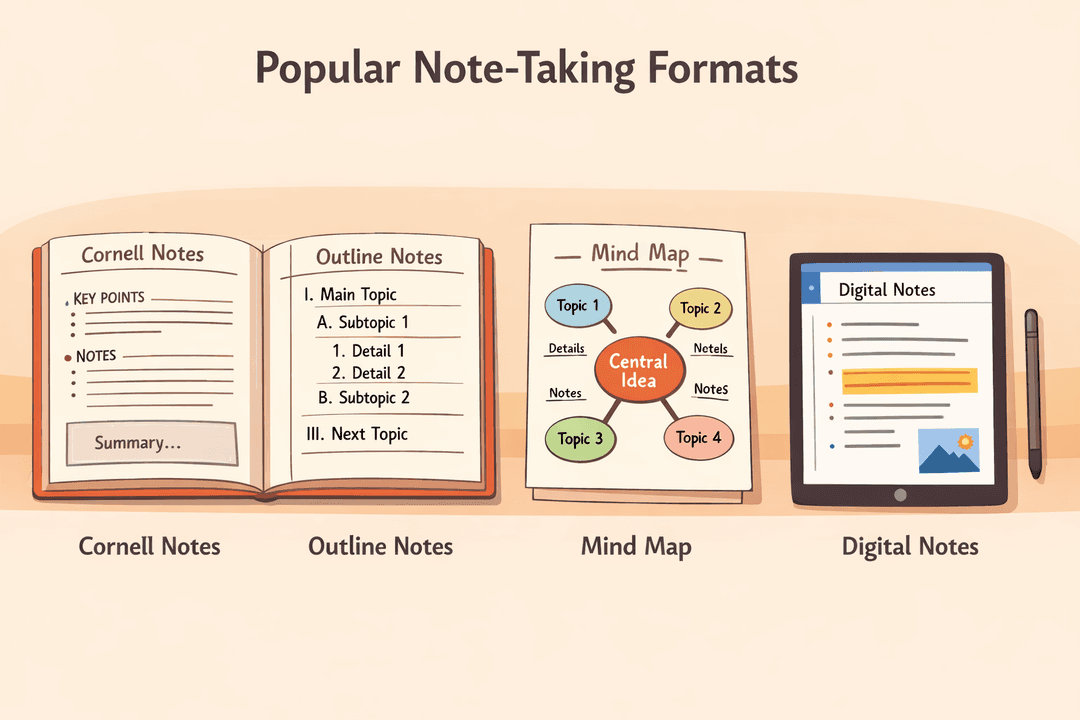
Developed at Cornell University in the 1950s, this system divides your page into three sections:
- Notes Column (right side, largest): Main notes during lecture/reading
- Cue Column (left side, narrow): Questions and keywords added after
- Summary Section (bottom): Brief summary of the page
How to Use Cornell Notes
During Class/Reading:
- Write main notes in the right column
- Use abbreviations and shorthand
- Leave space between topics
Within 24 Hours:
- Review your notes
- Write questions/cues in the left column
- These become self-test prompts
For Review:
- Cover the notes column
- Use cues to practice active recall
- Check accuracy against notes
Best For
- Lecture-based courses
- Content requiring memorization
- Students who want built-in review system
- Subjects with lots of facts and definitions
Pros and Cons
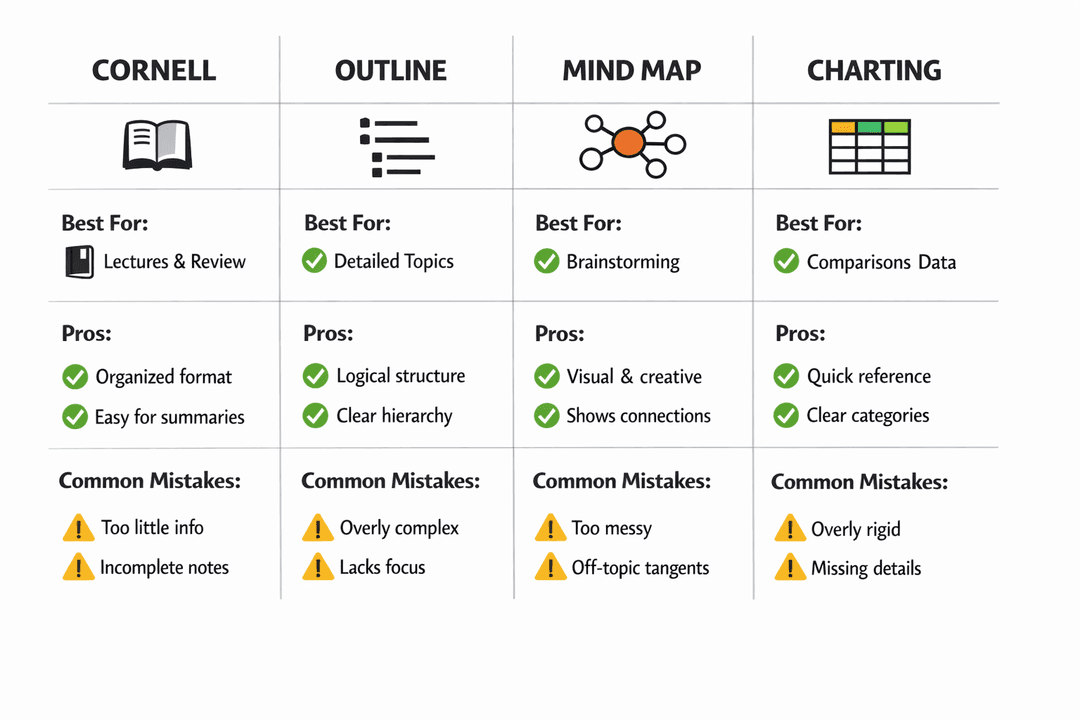
| Pros | Cons |
|---|---|
| Built-in review system | Requires reformatting during review |
| Encourages active recall | Not ideal for visual content |
| Organized structure | Page space constraints |
| Research-backed effectiveness | Less flexible for creative subjects |
Method 2: The Outline Method
Overview
The outline method uses indentation to show relationships between ideas:
I. Main Topic
   A. Subtopic
      1. Supporting detail
      2. Another detail
   B. Another subtopic
II. Next Main Topic
How to Use Outline Notes
- Start with main concepts at the left margin
- Indent subtopics and supporting details
- Use consistent formatting (numbers, letters, bullets)
- Leave space to add information later
Best For
- Well-structured lectures
- Textbook reading
- Subjects with clear hierarchies
- Legal and business studies
Pros and Cons
| Pros | Cons |
|---|---|
| Shows relationships clearly | Difficult if lecture is disorganized |
| Easy to review | Not good for visual concepts |
| Natural hierarchy | Can miss connections between sections |
| Quick to create | Requires good typing/writing speed |
Method 3: Mind Mapping
Overview
Mind mapping creates a visual representation of information, starting with a central concept and branching outward to related ideas.
How to Create Mind Maps
- Place main topic in the center
- Draw branches for main subtopics
- Add smaller branches for details
- Use colors to group related concepts
- Include images and symbols
Best For
- Brainstorming and creative subjects
- Topics with many interconnections
- Visual learners
- Review and synthesis of material
- Essay planning
Pros and Cons
| Pros | Cons |
|---|---|
| Shows connections visually | Hard to capture linear information |
| Engages creative thinking | Difficult during fast lectures |
| Great for review | Can become messy |
| Improves memory through visualization | Requires more space |
Method 4: The Boxing Method
Overview
The boxing method groups related information into visual "boxes" on the page, creating distinct clusters for different topics or concepts.
How to Use Boxing
- Draw a box around each topic cluster
- Keep related information together
- Use arrows to show connections between boxes
- Label each box clearly
Best For
- Subjects with distinct but related concepts
- Comparing and contrasting information
- Visual organization of complex topics
- Chemistry (reaction types), History (parallel events)
Pros and Cons
| Pros | Cons |
|---|---|
| Visual separation of topics | Takes practice to master |
| Easy to review specific sections | May waste space |
| Good for comparisons | Not ideal for linear content |
| Flexible layout | Can look disorganized |
Method 5: The Flow Method
Overview
Created by Scott Young, the flow method focuses on understanding over transcription. You capture the essence of ideas and their connections rather than detailed notes.
How to Use Flow Notes
- Write minimal notes – just key concepts
- Draw arrows showing relationships
- Add your own thoughts and questions
- Focus on understanding, not recording
Best For
- Conceptual subjects
- When you'll have access to recordings/slides
- Understanding complex theories
- Philosophy, literature, theoretical sciences
Pros and Cons
| Pros | Cons |
|---|---|
| Promotes deep understanding | Poor for memorization-heavy subjects |
| Engages critical thinking | Requires additional resources for review |
| Reduces cognitive load | Can miss important details |
| Creates personalized notes | Difficult for beginners |
Method 6: Digital Note-Taking with AI
The Modern Revolution
AI-powered note-taking tools are transforming how students capture and process information:
- Automatic transcription: Lectures converted to searchable text
- Smart summarization: Key points extracted automatically
- Question generation: Study questions created from notes
- Connection mapping: AI identifies relationships between concepts
How Stuley Enhances Note-Taking
At Stuley, we've built AI tools specifically for student note-taking:
Smart Notes Processing
- Upload lecture recordings, PDFs, or handwritten notes
- AI extracts key concepts and creates summaries
- Automatic flashcard generation for review
- Connected knowledge graph showing relationships
Active Learning Integration
- Notes automatically linked to study tools
- Spaced repetition scheduled for key concepts
- Practice questions generated from your notes
- Feynman AI helps test understanding
Best For
- Students managing multiple courses
- Long lectures or reading assignments
- Technical subjects with lots of terminology
- Anyone wanting efficient review systems
Choosing the Right Method
By Subject Type
| Subject | Recommended Method(s) |
|---|---|
| STEM | Outline, Cornell |
| Languages | Cornell, Flashcard-focused |
| History/Social Sciences | Cornell, Timeline + Outline |
| Arts/Literature | Mind Mapping, Flow |
| Medical/Nursing | Boxing, Cornell |
| Law | Outline, IRAC format |
| Business | Mind Mapping, Outline |
By Learning Situation
Fast-paced lectures: Outline or Cornell Slow/conceptual lectures: Flow or Mind Mapping Textbook reading: Cornell or Boxing Research synthesis: Mind Mapping Exam preparation: Cornell (for built-in recall)
By Learning Style
Visual learners: Mind Mapping, Boxing Sequential thinkers: Outline, Cornell Big-picture learners: Flow, Mind Mapping Detail-oriented: Cornell, Outline
Hybrid Approaches
The most effective students often combine methods:
Cornell + Mind Maps
- Use Cornell format for lectures
- Create mind maps during review to synthesize
- Mind maps help connect ideas across lectures
Outline + Visual Elements
- Use outline structure as base
- Add diagrams, charts, and visual elements
- Highlight connections between sections
Digital + Handwritten
- Take handwritten notes during class (better for encoding)
- Digitize and enhance using AI tools
- Use digital versions for review and flashcard creation
Note-Taking Best Practices
During Class/Reading
- Come prepared: Review previous material beforehand
- Listen for cues: "This is important," "There are three types..."
- Use abbreviations: Develop your own shorthand
- Leave space: Allow room to add information later
- Mark confusion: Note areas to clarify
After Class
- Review within 24 hours: Fill gaps while memory is fresh
- Reorganize if needed: Restructure messy notes
- Create questions: For active recall practice
- Connect to other material: Link to previous lectures
For Exams
- Consolidate notes: Create master summaries
- Generate practice questions: Test yourself
- Identify weak areas: Focus review strategically
- Use active recall: Don't just re-read
Common Note-Taking Mistakes
Mistake 1: Trying to Write Everything
Verbatim transcription:
- Prevents processing and understanding
- Creates information overload
- Wastes time during review
Solution: Focus on concepts, not sentences
Mistake 2: Never Reviewing Notes
Notes are useless if never reviewed:
- Schedule review sessions
- Use spaced repetition
- Convert notes to active study tools
Mistake 3: One Method for Everything
Different situations call for different methods:
- Experiment with multiple approaches
- Adapt based on subject and situation
Mistake 4: Ignoring Digital Tools
Modern AI tools can:
- Save hours of manual work
- Improve organization
- Create study materials automatically
The Future of Note-Taking
AI-Assisted Note-Taking
The next generation of note-taking combines human creativity with AI efficiency:
- Real-time transcription with intelligent summarization
- Automatic connection of ideas across courses
- Personalized study guides generated from your notes
- Intelligent review scheduling based on your learning patterns
Stuley's Vision
At Stuley, we believe notes should work for you:
- Upload anything: Lectures, readings, videos
- AI processes: Extracts key concepts, creates connections
- Study tools generated: Flashcards, quizzes, summaries
- Active learning enabled: Feynman AI tests understanding
- Progress tracked: Analytics show what needs attention
Getting Started
This Week's Action Plan
Day 1-2: Try Cornell method for one class Day 3-4: Experiment with mind mapping for review Day 5: Test outline method for textbook reading Day 6: Compare which methods felt most effective Day 7: Create a hybrid approach for next week
Start with Your Biggest Challenge
- Most difficult subject? Try a new method there
- Too many notes? Focus on selectivity
- Can't remember content? Add active recall component
Conclusion
The best note-taking method is the one that helps you learn, not just record. Different subjects, situations, and learning styles call for different approaches.
Don't be afraid to experiment, combine methods, and leverage AI tools to enhance your note-taking system.
Your notes should be a launchpad for learning, not just a transcript of information.
Transform your notes into powerful study tools. Stuley uses AI to convert your notes into flashcards, quizzes, and summaries automatically. Start studying smarter today.


